WordPress plugin that adds more Gutenberg CV blocks that let you show your Curriculum Vitae (CV) on a WordPress site.
| ansico-cv-blocks | ||
| ansico-cv-blocks.zip | ||
| LICENSE | ||
| README.md | ||
| Screenshot.png | ||


Ansico CV-Blocks
Adds more Gutenberg CV blocks that let you show your Curriculum Vitae (CV) on a WordPress site. See demo of plugin on https://www.aandersen.eu/curriculum-vitae/.
Features
Adds the following Gutenberg Block called "Company (CV)" where you can enter a company and employeed from and to. You can add a child block called "Position (CV)" for each position in that company. For each position you can enter department, employeed from and to and a list of skills you have achieved. The style is LinkedIn-liked style.
- Company (CV) Block - Enter company and the positions you have had in this company.
- Education (CV) Block - Enter educations for your CV.
- Profile Header (CV) Block - LinkedIn-like profile header with profile photo, cover photo, name, title, company or location and navigation menu.
- Content (CV) Block - Content block with a header and frame around.
- Container (CV) Block - Content block with frame around, but without header.
- Table of Contents (CV) Block - TOC block that lists and links to headers of Content (CV) Blocks.
- Contact Form (CV) Block - Simple contact form that lets your visitors contact you.
- Top Navigation (CV) Block - Top navigation of website with website title (your name).
- Profile (CV) Block - Profile block for a sidebar with photo and titles.
- Hide titles of single pages (setting on pages).
- Enable frame design on whole content area on pages (setting on pages).
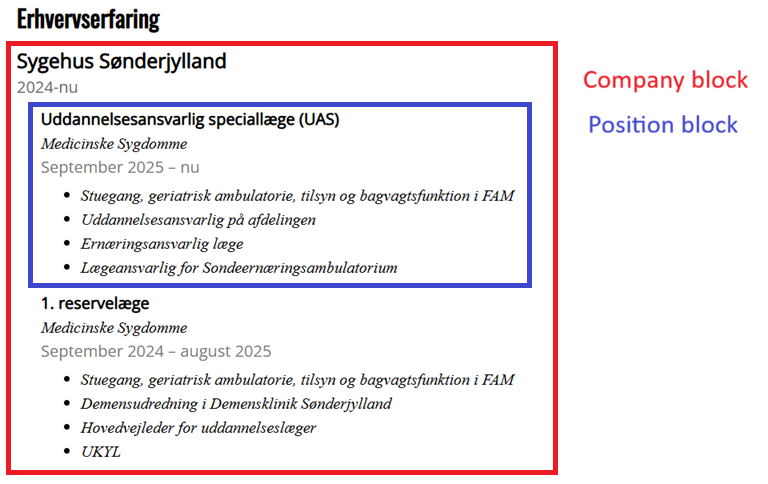
Installation
- Upload the plugin folder to /wp-content/plugins/ or using Plugins -> Add Plugin -> Upload Plugin.
- Activate the plugin through the WordPress admin.
- Add "Company (CV)" block in the block editor.
Version
- Version 1.0.0 (12/4 2026): Initial release of CV Experience Blocks.
- Version 1.0.1 (12/4 2026): Adjusted to WordPress Plugin Directory.
- Version 1.1.0 (13/4 2026): Changed name from Ansico CV Experience Blocks to Ansico CV Blocks. Added Education (CV) block, Profile header (CV) block, Content (CV) block, Container (CV) block, TOC (CV) block, Contact Form (CV) block, Top Navigation (CV) block, Profile (CV) block. Adds page settings to hide header and add frame design.
License
The plugin is licensed under GPL 3.0 or later, which means you free can use it and modify it. See more on https://www.gnu.org/licenses/gpl-3.0.html.
Follow me
Follow me on Mastodon on @aphandersen@andersen.one. Find more plugins on https://ansico.dk/ansico.